Head-to-head test
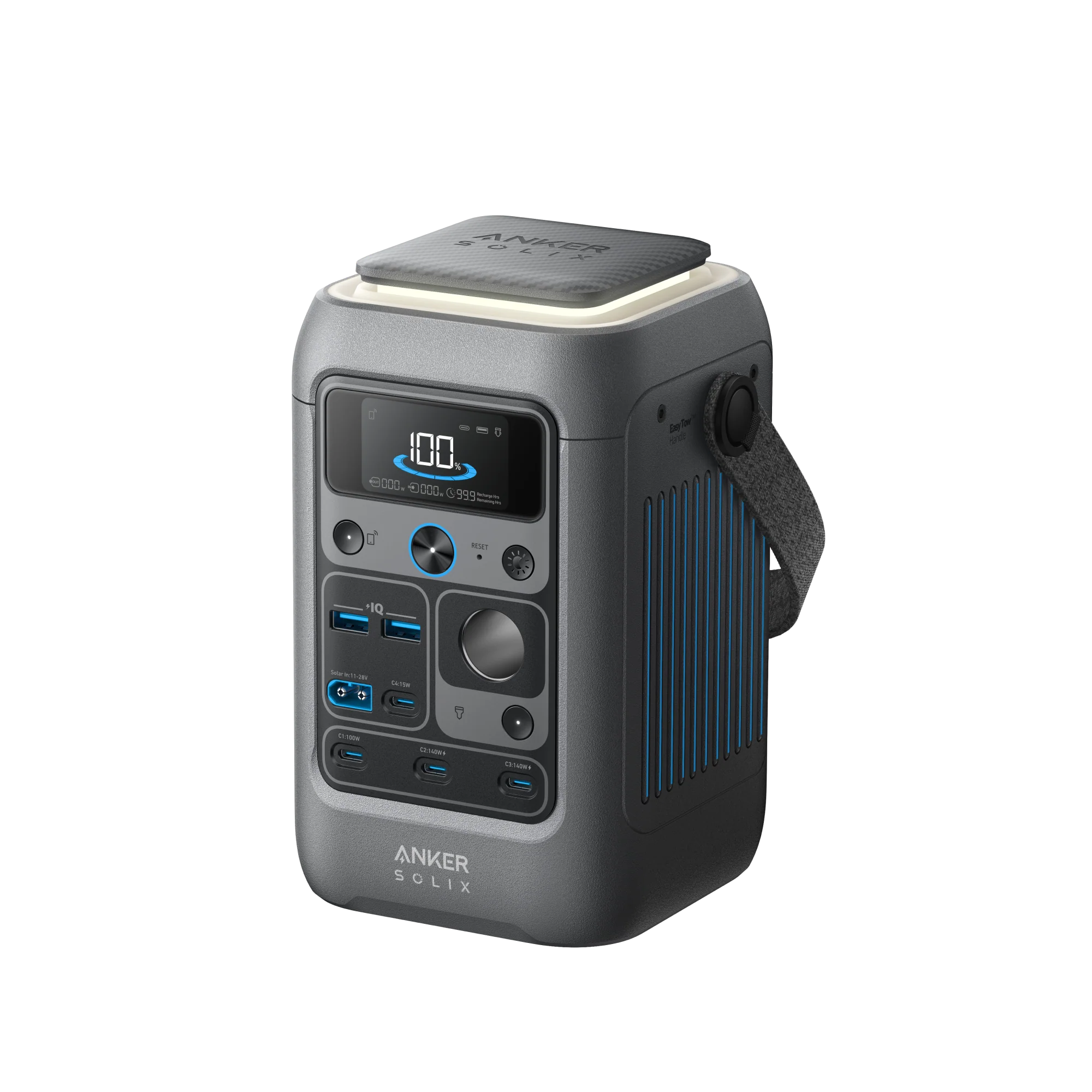
Anker SOLIX C300 DC vs Jackery Explorer 300
One of these can power a wall-outlet lamp or a barrel-plug CPAP; the other only speaks USB and 12V — that alone decides most purchases before price ever comes up.
Full profiles: Anker SOLIX C300 DC → · Jackery Explorer 300 →

Written by Wenny ZhengUpdated
Portable Power Tester, Station Arena Test Desk
Spec deltas
The Anker SOLIX C300 DC has no AC inverter. That single fact decides this comparison before any other spec matters: if anything you're charging has a wall-outlet plug, the C300 DC can't run it, and the Jackery Explorer 300 — with its 300W AC output — wins by default.
Take AC out of the equation and the comparison flips hard. The C300 DC costs $89 less, weighs nearly a pound less, is rated for six times the charge cycles, and charges over a 140W USB-C port more than double the wattage of the Explorer 300's 60W max.
This isn't really a spec battle so much as two different tools that happen to look similar in a product photo — a USB charging brick with a battery, against a small AC generator with USB ports bolted on.
What the Numbers Reveal
Each conclusion stated first — the numbers behind it on one line, the full analysis below.
An inverter is heavy hardware whether or not you use it; cutting it saves weight and cost but also removes an entire category of device from the unit's job description.
SOLIX C300 DC has no AC inverter — it's a DC-only designA1SOLIX C300 DC weighs 6.17 lb against the Explorer 300's 7.1 lbExplorer 300 outputs 300W AC continuous, 500W surge
Why it mattersCheck your load list for anything with a wall plug before buying the C300 DC — one match and the answer is the Explorer 300, no further comparison needed.
Typical price
For a laptop-and-phone kit with no AC devices in it, the C300 DC beats the Explorer 300 on basically every number that matters, not only price.
SOLIX C300 DC has a 140W max USB-C port with two-way PD 3.1 that recharges the unit to 80% in about an hourA2Explorer 300's max USB-C is 60WSOLIX C300 DC costs $200 against the Explorer 300's $289
Why it mattersRemote workers and digital nomads with USB-C-only gear should buy the C300 DC without weighing AC output at all.
$0.20 per lifetime kWh is the cheapest number attached to any unit paired against the Explorer 300 — cutting the AC inverter didn't just cut weight, it produced the best lifetime economics of the bunch.
SOLIX C300 DC is rated for 3,000 cycles against the Explorer 300's 500SOLIX C300 DC's lifetime cost works out to $0.20 per kWh against the Explorer 300's $1.77SOLIX C300 DC carries a 3-year warranty against the Explorer 300's 2-year
Why it mattersAnyone who's confirmed they don't need AC output has no economic reason left to consider the Explorer 300.
The missing noise spec here reads less like an omission and more like a unit that mostly has nothing to be loud about.
SOLIX C300 DC's noise level is not disclosed on the spec sheetSOLIX C300 DC has no AC inverter runningExplorer 300 discloses 36dBA
Why it mattersBuyers who care about fan noise shouldn't rule out the C300 DC over the blank spec field — the DC-only design gives it less reason to be loud than a unit running a full inverter.
The specific dimensions that decide these two units — everything else is a tie.
PowerScore Breakdown
Selected because: The composite score needs a footnote — it rewards categories the DC-only design wins by default, not AC capability.
overall power score
Anker's composite power score comes out well ahead of Jackery's here, but that number needs a footnote the raw score doesn't carry: it's measuring cost, cycle life, charging speed, and portability — categories where a DC-only design has a structural advantage — not AC output, where the C300 DC has literally nothing to offer. A high power score on a unit that can't run a lamp is a real result, but it's answering a narrower question than the score alone implies.
Read the score as best value and durability for USB-and-12V loads, not as better power station in the general sense. For AC loads, the score is irrelevant — the C300 DC doesn't compete in that category at all.
Lifetime Value
Selected because: Cheapest per-lifetime-kWh number in this whole comparison set.
cost / lifetime kWh
$0.20 per lifetime kilowatt-hour is the cheapest figure attached to any unit in this set, beating even units that cost more up front. At $200, the C300 DC is $89 cheaper than the Explorer 300 and rated for six times the cycles — the gap compounds rather than offsetting.
Cost per warranty-year backs it up: $57 a year for the C300 DC against $130 for the Explorer 300. Anker is quietly backing this unit for less money per year of coverage than Jackery backs its own.
Portability & Form Factor
Selected because: The weight gap is literally the missing AC inverter's worth of hardware.
weight
6.17 lb against 7.1 lb isn't a dramatic gap on its own, but it's the C300 DC shipping without an AC inverter's worth of hardware — the weight savings and the missing wall outlet are the same design decision, not two separate ones.
If your charging needs are entirely USB-C, USB-A, and 12V, the lighter unit is also the cheaper, longer-lived one — a rare case where every axis points the same direction.
What the Specs Don't Tell You
Selected because: Warranty and cycle life fire hard for the C300 DC; noise disclosure cuts the other way.
rated cycles
The warranty and cycle-life gotchas both favor the C300 DC by wide margins — 3,000 cycles against 500, a 3-year warranty against 2. The noise-disclosure gap cuts the other way on paper, though the missing AC inverter is a reasonable, if unconfirmed, explanation for why Anker didn't bother measuring it.
The real gotcha on this pair isn't a checklist item at all — it's the AC inverter itself, which the spec table doesn't have a dedicated row for but which decides the comparison before anything else does.
Brand Trust
Selected because: Anker's newer SOLIX line against Jackery's wider but slower-moving lineup.
Anker's SOLIX line is newer to portable power than Jackery's Explorer series, but it's carrying Anker's decades of consumer-electronics trust and a genuinely strong dollar-per-watt-hour position on this Gen 2 lineup. Support quality is reportedly drifting from Anker's historically excellent standard toward more generic AI-driven responses, worth knowing before you count on white-glove service.
Jackery still wins on raw brand recognition and retail shelf space, but its app is the weakest-reviewed of the major brands and its community is the smallest. If brand trust is the tiebreaker, Anker's reputation is younger but currently the stronger bet on paper.
Strengths & trade-offs
Anker SOLIX C300 DC
Strengths
- +Costs $89 less
- +Lighter by 0.9 lb
- +Longer warranty
- +Rated for 3,000 charge cycles — much longer battery lifespan
Trade-offs
- –No major technical downsides compared to rival.
Jackery Explorer 300
Strengths
- +Larger battery capacity
Trade-offs
- –Substantially more expensive (+$89) than the SOLIX C300 DC.
- –Lacks smartphone app control for remote monitoring.
- –Shorter-lived battery — rated for 800 charge cycles vs the SOLIX C300 DC's 3,000, so it wears out sooner.
Will It Power Your Gear?
Scenario math and per-appliance runtimes, modeled from the spec record.
Scenario verdicts
We ran the math on seven real-world scenarios. Here's which unit survives your actual life.
SCN-01 · 2 nights · needs 2,100Wh
Weekend Camping
Two nights off-grid with essential comfort
Neither unit
The SOLIX C300 DC has no AC outlets, so the led lights and box fan in this scenario never plug in — it's a DC station for USB and 12V gear, and no wattage figure changes that, so capacity never gets a say. This is the wrong kind of unit for the job rather than a close call. The Explorer 300 doesn't have the energy either — 249Wh usable against 2,100Wh, 1,851Wh short — so neither route works.
Battery budget usedlower = more headroom
LOAD Phone Charger 15W×6h · LED Lights 40W×8h · Box Fan 75W×14h · CPAP Machine 40W×16h
SCN-02 · 8 hours · needs 1,645Wh
8-Hour Blackout
Keep the essentials running through a night without power
Neither unit
The SOLIX C300 DC has no AC outlets, so the fridge, router + modem and the rest in this scenario never plug in — it's a DC station for USB and 12V gear, and no wattage figure changes that, so capacity never gets a say. This is the wrong kind of unit for the job rather than a close call. The Explorer 300 doesn't have the energy either — 249Wh usable against 1,645Wh, 1,396Wh short — so neither route works.
Battery budget usedlower = more headroom
LOAD Fridge 150W×8h · Router + Modem 20W×8h · LED Lights (4 bulbs) 40W×6h · Phone Charger 15W×3h
SCN-03 · 8 hours · needs 320Wh
CPAP Overnight
Sleep therapy without interruption — the #1 medical use case
Neither unit
Neither unit covers this scenario's 320Wh: the SOLIX C300 DC comes up 75Wh short (about 76% covered), the Explorer 300 71Wh (78%). Either gets you most of the way, so this is a scenario you plan around rather than one you should rule them out for.
Battery budget usedlower = more headroom
LOAD CPAP Machine 40W×8h
SCN-04 · 8 hours · needs 910Wh
Remote Workday
Full work day off-grid without power anxiety
Neither unit
The SOLIX C300 DC has no AC outlets, so the external monitor and router + modem in this scenario never plug in — it's a DC station for USB and 12V gear, and no wattage figure changes that, so capacity never gets a say. This is the wrong kind of unit for the job rather than a close call. The Explorer 300 doesn't have the energy either — 249Wh usable against 910Wh, 661Wh short — so neither route works.
Battery budget usedlower = more headroom
LOAD Laptop 60W×8h · External Monitor 30W×8h · Router + Modem 20W×8h · Phone Charger 15W×2h
SCN-05 · 4 hours · needs 670Wh
Tailgate Party
Game day power for the crew
Neither unit
The SOLIX C300 DC has no AC outlets, so the blender and led tv in this scenario never plug in — it's a DC station for USB and 12V gear, and no wattage figure changes that, and the Explorer 300 can start the 400W peak but not hold it — 500W of surge gets it going, then the 300W continuous rating takes over, so capacity never gets a say. This is the wrong kind of unit for the job rather than a close call.
Battery budget usedlower = more headroom
LOAD Blender 400W×0.5h · LED TV (55") 80W×4h · Bluetooth Speaker 15W×4h · Phone Charger (×3) 45W×2h
SCN-06 · 24 hours · needs 4,685Wh
Van Life Daily
A full day of mobile living — the ultimate endurance test
Neither unit
The SOLIX C300 DC has no AC outlets, so the mini-fridge, led lights and the rest in this scenario never plug in — it's a DC station for USB and 12V gear, and no wattage figure changes that, so capacity never gets a say. This is the wrong kind of unit for the job rather than a close call. The Explorer 300 doesn't have the energy either — 249Wh usable against 4,685Wh, 4,436Wh short — so neither route works.
Battery budget usedlower = more headroom
LOAD Mini-Fridge 150W×24h · Laptop 60W×4h · Phone Charger 15W×3h · LED Lights 40W×5h · Fan 75W×8h
SCN-07 · an afternoon · needs 100Wh
Afternoon Off-Grid
Phones and a speaker at the park, beach, or campsite — the small-unit job description
Either unit
This is the job small stations are actually for, and both do it: the SOLIX C300 DC finishes at 41% used, the Explorer 300 at 40%. At this size the decider is what rides in the bag, then price, not the leftover watt-hours: the Explorer 300 weighs 7.1 lbs, and at 6.2 lbs the SOLIX C300 DC is the one you'll be glad you brought.
Battery budget usedlower = more headroom
LOAD Phone Charger (×2) 30W×2h · Bluetooth Speaker 10W×4h
The Load Test
RUNTIME = (Wh × 0.85) ÷ LOAD
None of the scenarios above exactly yours? Build it. Toggle what you'd plug in; both units are tested against the combined draw.
Essentials
Comfort & Convenience
High-Draw Appliances
Test duration
8h
Continuous draw
205W
Projected runtime
Only the Explorer 300 can run this load — the SOLIX C300 DC has no AC outlets for the wall-plug gear in it.
$289 list · direct from Jackery
Planning for more than this? Describe your whole setup and get it sized →
Modeled from the spec record — same math as the tables below. Methodology
Runtime by appliance
Real-world runtime estimates for common appliances, modeled at 85% inverter efficiency.¹
Essentials
The basics you need runningscale 0–16.6hComfort & Convenience
Makes off-grid life actually enjoyablescale 0–3.3hHigh-Draw Appliances
These reveal the real limits¹ Runtime = (capacity × 0.85) ÷ appliance watts. Within each group, all bars share one time scale (the group's longest runtime), so lengths are comparable across appliances; identical runtimes collapse into a single blue/orange bar. Actual runtime varies with battery age, temperature, and simultaneous loads — see methodology.
Conclusion
July 14, 2026
Verdict: the Jackery Explorer 300
Default to the Explorer 300 if you want a power station in the traditional sense — an actual AC outlet. The SOLIX C300 DC has no AC inverter at all, so anything with a two- or three-prong plug simply won't work on it. But if every device you're charging runs on USB-C, USB-A, or 12V — phones, laptops, cameras — skip the Explorer 300 and buy the C300 DC instead: it's $89 cheaper, nearly a pound lighter, charges faster over USB-C, and its 3,000-cycle cell outlasts the Explorer 300's 800-cycle rating nearly four times over.
Editor-assigned confidence, based on cited owner research and spec analysis.
List prices as of July 14, 2026. The links below open Anker's and Jackery's current prices.
$289.00 · direct from Jackery
Last checked 28 days ago. Prices move — check before you buy.
or check the SOLIX C300 DC price$349.99 list
Written by Wenny Zheng, Portable Power Tester · Station Arena Test Desk · Updated July 14, 2026
Black Friday · 26 days out
Prices to beat:SOLIX C300 DC $200Explorer 300 $189
The lowest we have recorded for each. We have never seen the SOLIX C300 DC discounted, so any real cut on it would be a first.
Measured Data
Benchmark scores and the full spec record, side by side.
Benchmark scores
Not rated for both units (minimum threshold unmet): Tailgating.
Full specifications
ᵈ Derived: price ÷ rated capacity. See the data behind our comparisons →
Comparison ToolAdd more power stations, side by sideOpen Tool →How these numbers are produced
Numeric verification
Every figure on this page traces to our spec database or arithmetic on it — no estimated numbers.
Owner claims
Statements about owner experience are cited to published reviews — see Sources & Research Notes below.
Runtime model
Runtime = (rated capacity × 0.85 inverter efficiency) ÷ device wattage. Solar recharge estimates assume panels deliver 70% of rated output. Cold weather, battery age, and stacked loads reduce real-world results.
Power Score
Computed from 14 published spec dimensions, weighted per use-case bench. Higher is better; a unit must meet a bench's minimum threshold to be rated.
See the full weight table and data sourcing on our methodology page →Class ranking (the star rating)
Each unit's star score is a category ranking, not customer reviews — no buyer opinions feed it. We score every station on size-independent quality (value, output, portability, endurance, ports, warranty, and more), then percentile-rank it against the other units in its capacity class, so a class-leading compact unit and a class-leading whole-home unit can both earn 5★. Here, SOLIX C300 DC rates 4.4/5 (67th percentile of 25 Personal-class units), and Explorer 300 rates 3.7/5 (21st percentile of 25 Personal-class units).
How the class ranking is computed →Test Notes & Caveats
Hidden gotchas and advantages we spotted that you won't find on the product page.
SOLIX C300 DC: No AC Outlets At All
The SOLIX C300 DC's 300W is a DC port total — USB and 12V — not an inverter rating. Anything with a wall plug (a fridge, a TV, a coffee maker, most fans and lamps) never plugs in, at any wattage. That's the design, not a defect: it buys weight, silence, and efficiency for phone, laptop, camera, and 12V-CPAP loads. The Explorer 300 carries a real inverter behind 2 AC outlets, so it plays in both worlds. Decide which side of that line your gear lives on before weighing anything else on this page.
Explorer 300: No App Control
Without app control, you have to physically walk to the Explorer 300 to check battery level, adjust settings, or monitor power draw. The SOLIX C300 DC lets you do all that from your phone, including getting low-battery alerts.
Warranty: 3 Years vs 2
The SOLIX C300 DC is covered for 3 years against the Explorer 300's 2 years. An underrated factor if you're keeping this unit for years.
Battery Lifespan in Real Years
The SOLIX C300 DC is rated for 3,000 cycles vs 800. In real life: at daily use, that's 8.2 vs 2.2 years. At weekend use (twice a week), it's 29 vs 8 years. After hitting the cycle limit, the battery doesn't die — it drops to ~80% of original capacity, which is still very usable.
No Decibel Rating, and a Plausible Reason Why
Anker doesn't publish a noise spec for the C300 DC. Worth noting: the C300 DC has no AC inverter running, usually the loudest, hottest-running part of a power station — less reason for a fan to spin up in the first place, though that's a structural inference, not a measured number.
Full record above — the Test Desk pick is the Explorer 300.
Check Explorer 300 price →or check the SOLIX C300 DC priceOwnership Analysis
What happens after you buy — true cost of ownership, brand trust, and growth potential.
Lifetime value
Service lifeyears at one full cycle per day
Lifetime energy delivered
Cost per delivered kWh
│ warranty ends · Reaching the cycle rating means ~80% capacity remains — degraded, not dead.
Analyst note
The SOLIX C300 DC wins on both sticker price and long-term value. At $0.23/kWh over its lifetime, it's meaningfully cheaper to own. Clear value winner.
Brand trust
Anker
Ecosystem
A newer, tighter lineup than Jackery's — 7-8 SOLIX stations across the compact C-series and flagship F-series — riding on Anker's much larger consumer-electronics brand.
Support
Historically known for near-frictionless replacements; recent reports describe more generic AI-driven support responses and complicated return logistics for heavier units.
Community
Moderate — active Reddit (r/Anker, r/AnkerSOLIXCommunity) and growing. Benefits from Anker's massive consumer electronics brand awareness.
App experience
Rated 4.5/5 iOS (~1,100 ratings) · 4.3/5 Android
Unique strength
Some of the best dollar-per-watt-hour value in the market right now on this Gen 2 lineup — the C300 DC's price is the cheapest per-Wh in this comparison set.
Worth knowing
Support quality appears to be declining from its historically excellent level. Firmware updates have removed features without warning. Expansion ecosystem is smaller than EcoFlow's.
Jackery
Ecosystem
Wider model lineup and the deepest retail distribution of any brand in this comparison — Costco, Home Depot, Best Buy, Amazon.
Support
Reddit reports describe scripted responses and strict receipt requirements; a big-box retailer's own return window is the safer backstop.
Community
Smallest community of the major brands — Reddit r/Jackery has ~2,000 members. YouTube presence is solid due to brand recognition.
App experience
Rated 2.3-3.3/5 iOS and Android — the weakest app experience of the major brands. Multiple confusing apps (Jackery app vs Jackery Home) and mandatory login even offline.
Unique strength
Highest brand recognition and widest retail distribution (Costco, Home Depot, Best Buy, Amazon). The "Toyota" of power stations — dependable, proven, wide availability. Innovative form factors like the Solar Gazebo and Solar Mars Bot.
Worth knowing
The 800-cycle rating on this listing reflects older battery chemistry — Jackery has been the slowest of the major brands to move fully to newer LFP cells.
Analyst note
Anker's newer SOLIX line currently posts better dollar-per-watt-hour value and warranty terms than Jackery's Explorer line, though Jackery's much wider retail footprint is worth something if returns matter more to you than price.
Growth path
SOLIX C300 DC
FIXED CAPACITYFixed at 288Wh, with no expansion — so size it for your needs up front rather than planning to add capacity later.
Accepts up to 100W of solar. Limited to a single portable panel.
Adequate ports for most setups, but heavy users may want a power strip.
Explorer 300
FIXED CAPACITYFixed at 293Wh, with no expansion — so size it for your needs up front rather than planning to add capacity later.
Accepts up to 100W of solar. Limited to a single portable panel.
Limited ports. You'll likely need a power strip or splitter.
Realistic full solar rechargeat 70% of rated panel output — see methodology
Analyst note
Neither expands, and that's no knock on either — each is a complete unit at a fixed size. Buy the capacity that covers your needs now (the Explorer 300 gives you the larger ceiling); you can't add to either later.
What Owners Report
Patterns from published owner reports and long-term reviews — every claim cited to its source below.
Anker SOLIX C300 DC
Reviewers are consistent about what the C300 DC actually is: a DC-focused design for modern travelers charging devices, not a stand-in for a unit that runs AC appliancesA4. Its two-way USB-C port supports PD 3.1 and recharges the unit to 80% in about an hour, alongside 2 USB-A ports, 4 USB-C ports total, and a 12V car socketA2. Owners report using it to charge a phone and laptop several times over, run a fan for hours, or power a small light setup — squarely the device-charging use case Anker built it forA3. Cutting the AC inverter is what keeps it at roughly 6.2 lb, genuinely light for a 288Wh unitA1.
“A 288Wh unit that ditches the heavy AC inverter to focus on DC power, keeping it very light at about 6.2 lbs.”
Sources
the-gadgeteer.com · forbes.com · androidpolice.com · batteryessence.com · bestbuy.com · campingsolar.us
Jackery Explorer 300
One Explorer 300 owner ran phones, a speaker, a fan, and an air mattress pump off it on a camping trip and called it easy to use, lightweight, and quietB3 — the kind of general-purpose flexibility the C300 DC's USB-only design can't match if any of those devices needed a wall plug. A second owner used it for daily small-load recharging over about two weeks between chargesB4, and the unit is somewhat heavier than the C300 DC at 7.1 lb versus 6.17 lb. That weight difference is really the AC inverter Jackery includes and Anker doesn't; the spec sheet's 800-cycle rating on this listing, versus the far longer-lived LFP cell in Jackery's newer 300 PlusB0, is the tradeoff that inverter comes with.
“288Wh capacity with 300W output on LiFePO4 chemistry rated for 3,000+ cycles — over a decade of daily use, a major upgrade from the older lithium-ion Explorer 300 (500 cycles).”
Sources
powerstationlab.com · batteryskills.com · voltagebasics.com · rv.com · bestbuy.com
Sources & Research Notes
Every owner claim in this report is traceable to a published source. The bracketed references above resolve here.
Recurring owner themes
- Light DC-only design (no AC inverter), fast USB-C charging, and good port selection for device charging are the highlights. [SOLIX C300 DC · 3 entries]
- Light weight, LFP 3,000-cycle longevity, quiet operation, and easy portability are the consistent praise for this small unit. [Explorer 300 · 3 entries]
- A1
“A 288Wh unit that ditches the heavy AC inverter to focus on DC power, keeping it very light at about 6.2 lbs.”
the-gadgeteer.com / forbes.com — SOLIX C300 DC review · 2026 · [positive]
- A2
“Offers 2 USB-A and 4 USB-C ports plus a 12V car socket; two-way USB-C with PD 3.1 recharges the unit to 80% in about 1 hour.”
androidpolice.com / batteryessence.com — SOLIX C300 DC review · 2026 · [positive]
- A3
“Owners praise its portability and capacity — enough to charge a phone and laptop several times, run a fan for hours, or power a small light setup.”
bestbuy.com owner reviews — SOLIX C300 DC / C300X · 2026 · [positive]
- A4
“A DC-focused design with app integration and solar support — best for modern travelers charging devices, not running AC appliances.”
androidpolice.com / campingsolar.us — SOLIX C300 DC review · 2026 · [mixed]
- B3
“One owner powered phones, a speaker, a fan, and an air mattress on a camping trip with no issues, calling it super easy to use, lightweight, and quiet.”
bestbuy.com owner reviews — Explorer 300 Plus · 2026 · [positive]
- B4
“Another owner recharged multiple electronics daily and ran small-wattage devices for about two weeks before reaching a low charge.”
bestbuy.com owner reviews — Explorer 300 Plus · 2026 · [positive]
Research compiled July 14, 2026.
What Owners Actually Report
Drawn from 30 comments on independent review channels — not from retailer reviews, which skew to the first week of ownership. Each line is our summary of one commenter's claim, linked to the original. We record what they said, including where it contradicts the spec sheet.
Anker SOLIX C300 DC
12 claims from 8 comments · 10 from owners · 5 with figures
- Solar input
- 4 · 100% negative
- Runtime
- 2 · 0% negative
- Charging
- 2 · 39% negative
- Other
- 1 · 0% negative
- Size & weight
- 1 · 0% negative
What owners complain about
28V input ceiling blocks a 25.6V LiFePO4 bank, which can reach 29.2V fully charged.
Solar inputmeasuredowner4 agreedsource →
Says the C300 DC has no pass-through charging and just cycles between 98% and 100%.
Charging7 agreedsource →
DC5521 plugs with poor tolerances have heated up at 5A; wishes it used XT60 throughout.
Build qualityownersource →
What owners praise
BiPAP with heated hose and humidifier at 80% used 47% of the 288Wh pack over 5 hours of sleep.
Runtimemeasuredowner5 agreedsource →
Can be charged over USB-C at up to 140W, which he thinks is fantastic.
Chargingmeasuredownersource →
His favorite unit: small, transportable, very efficient on 12V and charges well off solar.
Otherownersource →
Jackery Explorer 300
29 claims from 22 comments · 20 from owners · 6 with figures
- Runtime
- 9 · 36% negative
- Solar input
- 3 · 0% negative
- Price & value
- 5 · 94% negative
- Durability
- 3 · 8% negative
- Other
- 3 · 53% negative
What owners complain about
Plans to return the day-old Jackery 300 after seeing the EB3A review.
Price & valueowner8 agreedsource →
Metered 235Wh delivered against an advertised 288Wh, about 80% usable.
Runtimemeasuredowner1 agreedsource →
Returning the Jackery 300 bought to run a compressor fridge and ordered an EB3A.
Otherowner2 agreedsource →
What owners praise
Fully charges in 3 hours from a 100W panel in full sunshine.
Solar inputmeasuredowner43 agreedsource →
Has been great for about 3 years and performs better than the budget rival tested in the video.
Durabilitymeasuredownerafter 36 months6 agreedsource →
Enough to run a lamp and a few small items where there is no grid wiring.
Runtimeowner43 agreedsource →
Claims are weighted by how specific they are, whether the commenter owns the unit, and how many readers agreed. Comments that mention a product under a rival's review count for more, because the commenter had no reason to be there. This is what buyers report, not our test results — for measurements we ran ourselves, see the methodology.
Who Should Buy Which
Buy the SOLIX C300 DC if you…
- →Anyone whose entire load list is USB-C, USB-A, or 12V — phones, laptops, cameras, dash cams — where the C300 DC is cheaper, lighter, and faster-charging with no AC tradeoff.
- →Remote workers who need to fast-charge a power-hungry laptop and value the 140W USB-C port over an AC outlet they won't use.
Buy the Explorer 300 if you…
- →Anyone with even one device that needs a real wall-outlet plug — a CPAP with a barrel connector, a table lamp, a laptop charger without USB-C — since the C300 DC can't power any of them.
- →Buyers who want one unit that covers both AC and USB loads without thinking about it, even at a higher price and shorter cycle life.
If neither fits
Anyone needing to run more than one AC device, or anything above roughly 300W continuous, should skip both — a mini fridge compressor or a space heater needs a larger-inverter unit than either of these.
The Bottom Line
The AC inverter is the whole decision: the Explorer 300 has one and the C300 DC doesn't, so anyone with a wall-outlet device should buy the Jackery without further comparison.
Everyone else — anyone charging phones, laptops, and USB gear exclusively — should buy the C300 DC instead. It's $89 cheaper, lighter, faster over USB-C, and rated for six times the cycle life, and none of that AC capability was ever going to get used anyway.
Frequently Asked Questions
Answers drawn from the spec record and cited owner research.
Does the Anker SOLIX C300 DC have an AC outlet?
No — it's a DC-only design with USB-C, USB-A, and a 12V car socket, but no wall-outlet plug at all. If you need to plug in anything with a standard two- or three-prong plug, you need the Jackery Explorer 300 or a different AC-equipped unit.
Is the Anker SOLIX C300 DC cheaper than the Jackery Explorer 300?
Yes, by $89 — $200 against $289 — and it's also rated for six times the charge cycles and a year longer warranty. The tradeoff is the missing AC inverter, which is the whole reason it's cheaper and lighter.
Which charges faster over USB-C?
The C300 DC, by a wide margin — its 140W USB-C port is more than double the Explorer 300's 60W maximum, and it recharges to 80% in about an hour over that port.
Is the Jackery Explorer 300 actually rated for 500 or 3,000 charge cycles?
This listing shows 800 cycles to 80%. Field reviews describing far higher cycle counts are covering Jackery's newer LFP 300 Plus; buy on the 800-cycle number you see today.
Which is better for camping?
Match it to your device list, not the camping label. Phones, laptops, and a headlamp favor the cheaper, lighter C300 DC; a camp light on AC power or a barrel-plug CPAP only works on the Explorer 300, since the C300 DC has no wall outlet at all.
Where to buy
Anker SOLIX C300 DC
$349.99
$349.99 · direct from Anker
Last checked 28 days ago. Prices move — check before you buy.

Jackery Explorer 300Pick
$289.00
$289.00 · direct from Jackery
Last checked 28 days ago. Prices move — check before you buy.
Prices may vary by retailer and are subject to change.